BabyInHeight
Starting Trainer
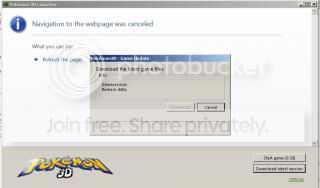
what can i do to fix this? :/

✨ ARCHIVE MODE ✨
The forum has now been set to read-only mode, no new posts, resources, replies etc will not be possible.
We recommend you join our Discord server to get real-time response: Discord Invite Link


You downloaded it directly from the website? If you did that, it should be the latest version.i tried re-downloading the game but it still does not work :/
Remove the Pokemon 3D folder from your computer and download it anew from http://pokemon3d.net/.yes i did, but it said the navigation failed and the launcher is not updated
Will it not allow you to start the game either?even though i removed the folder and re-download the game, I can't seem to start the game. The launcher still says the same thing "Navigation was canceled"
Yes, it won't :/Will it not allow you to start the game either?even though i removed the folder and re-download the game, I can't seem to start the game. The launcher still says the same thing "Navigation was canceled"


Although your issue is similar, please do not post in threads that have not had any activity for over a month. I would've posted my own thread, but since you posted here, there's not much point in doing that now.I am also having a problem with this too. I downloaded version .40 and then could only play offline. I then stopped playing for a few weeks and then when I entered the launcher, I had the same issue. I then deleted all of my files from the computer and then re-downloaded the entire game file, but now I can't play. I try to download from the site but the launcher will not let me load the file. I did try to load the game from the game file and extracted it. But still, I cannot play due to the launcher. I did check the my firewall and security settings, but everything seems to be in order. It seems that I am now unable to play the game altogether due to the launcher and it is the downloaded version of 2.2.2
