Looks like the only way to understand logless crash/unknown crash that splitzblue is facing atm also...
We need a crash log that is recorded the instance the game decided to force close itself.
This crash log is recorded into your computer itself which can be found in the "Event Viewer" apart from the nicely generated crash log on Pokemon folder.
Event Viewer is a tool that displays detailed information about significant events (for example, programs that don't start as expected or crash suddently... )
- Open Event Viewer by going to the Control Panel, clicking System and Security (For category view), clicking Administrative Tools, and then double-clicking Event Viewer.
If you're prompted for an administrator password or confirmation, type the password or provide confirmation.
This application is in everybody's computer. We normally do not use this since other application crash logs are not like how P3D is... they are crap and not useful.
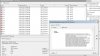
Now you would see something like this...
At the center, you will see Critical, Error and warning... I want the section on error or in critical.
You should be able to expand that section and double click on the application. If you find that you are lost... At the left panel, there is a application windows log double click on it.
Find Pokemon 3D most lastest crash and it will have a crash log written at the bottom panel.
It should look similar to this with the application name called "Pokemon.exe"
Code:
Application: P3D DataBase Explorer.exe
Framework Version: v4.0.30319
Description: The process was terminated due to an unhandled exception.
Exception Info: System.InvalidOperationException
Stack:
at System.Data.ProviderBase.DbConnectionInternal.TryOpenConnectionInternal(System.Data.Common.DbConnection, System.Data.ProviderBase.DbConnectionFactory, System.Threading.Tasks.TaskCompletionSource`1<System.Data.ProviderBase.DbConnectionInternal>, System.Data.Common.DbConnectionOptions)...
...
If you can't find it or it looks totally different than the one shown above, then never mind.