ianfleming50
Starting Trainer
Hi! I would like to suggest a few things 
Firstly could we please remove the pokemon that tags along with the player avatar or make it smaller? Preferably change the view angle to a higher point (Maybe 35-45 degrees?), as the pokemon avatar often makes it hard to navigate within game, and the only way I've been coping with this is by increasing the FOV to 120, which looks kinda trippy as if I were looking at the game through fisheye lens, and still doesnt completely solve the problem as I cant see what is directly infront of my player avatar.
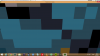
(As you can see from the attached screenshot 188, it's hard to see what is directly in front of the player)
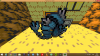
(and the attached screenshot 187, where I bumped into a bug that I haven't been able to replicate that practically blocks out the whole screen with gyarados)
This other suggestion would require lots of work from the dev team, and I would understand if they were to ignore it. I would suggest that environmental models, such as the crystals in Mt.Moon, bushes, and boulders, be replaced with full 3D models instead of the rotating 2D models hat are currently in gamee, as they can be extremely disorientating, especially when navigating through the maze in Mt.Moon (used the "Q" minimap mode to navigate it more effectively myself).
TQVM for taking the time for reading this!
Firstly could we please remove the pokemon that tags along with the player avatar or make it smaller? Preferably change the view angle to a higher point (Maybe 35-45 degrees?), as the pokemon avatar often makes it hard to navigate within game, and the only way I've been coping with this is by increasing the FOV to 120, which looks kinda trippy as if I were looking at the game through fisheye lens, and still doesnt completely solve the problem as I cant see what is directly infront of my player avatar.
(As you can see from the attached screenshot 188, it's hard to see what is directly in front of the player)
(and the attached screenshot 187, where I bumped into a bug that I haven't been able to replicate that practically blocks out the whole screen with gyarados)
This other suggestion would require lots of work from the dev team, and I would understand if they were to ignore it. I would suggest that environmental models, such as the crystals in Mt.Moon, bushes, and boulders, be replaced with full 3D models instead of the rotating 2D models hat are currently in gamee, as they can be extremely disorientating, especially when navigating through the maze in Mt.Moon (used the "Q" minimap mode to navigate it more effectively myself).
TQVM for taking the time for reading this!
Attachments
-
 51 KB Views: 472
 -
 122.8 KB Views: 470